
Read about the latest features and improvements in the Stratsys platform and how they can help you improve your work and get even more value.
Platform news
Stratsys AI
This development is included in AI license.
Stratsys Assistant - Support for analyzing Excel documents
We have extended the functionality of our AI Assistant with support for analyzing Excel documents. This means that you can now upload or work with data directly from Excel and get help to quickly identify patterns, summarize content and draw relevant insights. This feature is particularly useful for those working with follow-up, reporting or larger data sets, where manual analysis can otherwise be time-consuming.
For example, the AI assistant can help highlight anomalies, create clear summaries or provide suggestions on how to interpret data. The goal is to make it easier to transform raw data into decision support and save time in daily work.
AI suggestions - increased control and flexibility
We have made it easier and more flexible to administer the platform's AI features by allowing you as an administrator to activate AI suggestions yourself. Previously, this was handled by Stratsys. This provides increased control and the ability to more quickly adapt the suggestions based on the needs of the business.
Related to this, we are introducing the possibility to set additional instructions, which allows for increased control of how the AI formulates its answers. By setting your own instructions, you can ensure that both AI proposals and AI summaries use your own concepts, terms and wording. This makes the results more recognizable, consistent, and better adapted to your organization's language and working methods.
Activation: AI suggestions and AI summaries and additional instructions are activated and customized per control model column.
More efficient presentation of relevant metrics
We have now released a long-awaited feature that allows multiple measurement data columns to be displayed in workspaces and reports more flexibly and efficiently, regardless of measure template. The feature has been developed to facilitate the visualization of large amounts of KPI data while reducing the need for administration.
- Clearer overall picture with multiple relevant metrics at the same time
- Reduced configuration time and neeed for manual adjustments
- Easier to ensure that the right data is used and presented in a consistent way
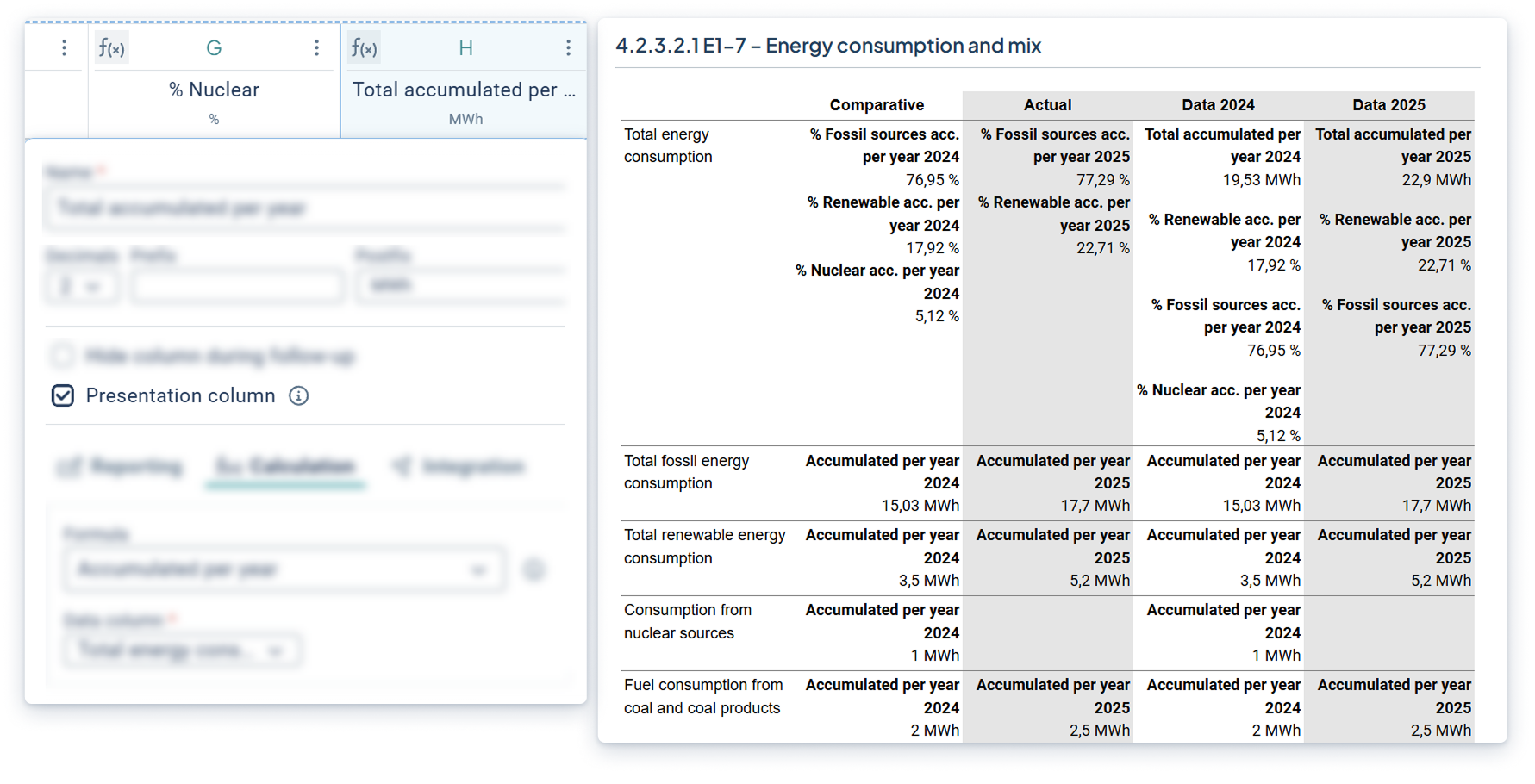
Activation: Select which measurement data columns that should be presented (presentation columns). This is done per measurement data column in KPI objects. Visualize the selected presentation columns in reports and workspaces using the 'presentation columns' property.
User account page - smoother and updated experience
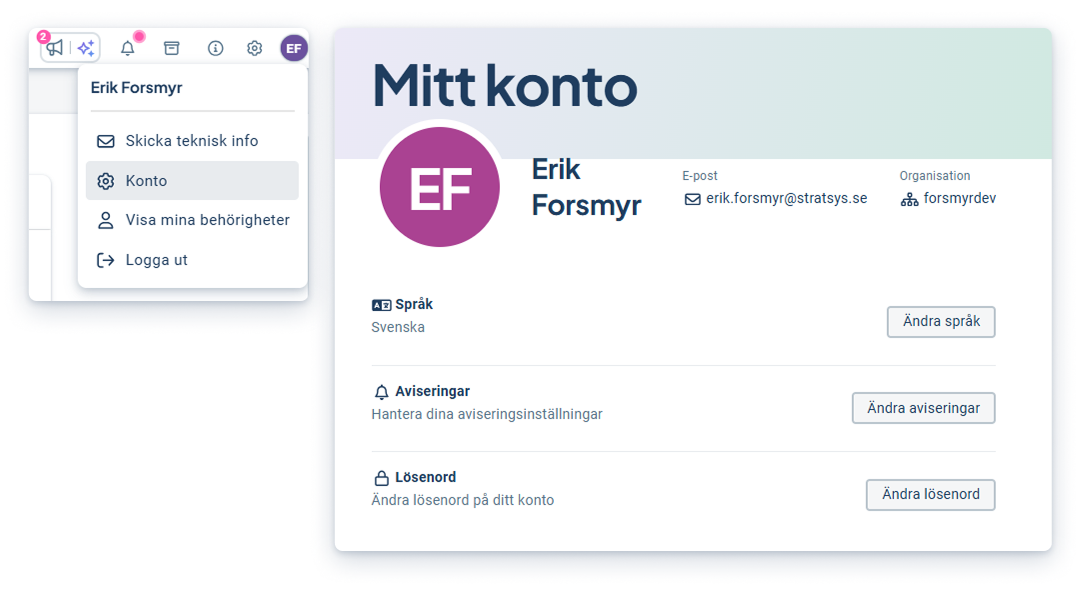
The account page has been improved with a more modern design and layout for a smoother and easier experience. Please take the opportunity to review your notification settings!
New workspace and object drawer
This development is included in the product license.
Here we communicate the major news and improvements that are continuously added to the workspace and object drawer. The functionality is available in all products. Contact your account manager to get started!
Risk matrix - improvements
Visualize and export the workspace matrix in reports
You can now include the new risk matrix visualization and its associated risk table in your reports for export. This makes the risk visualization consistent throughout the product flows - from workspaces to exporting reports. In the report, the matrix visualizes the total number of risks, while each individual risk is listed in the table below - automatically sorted from most to least critical.
- Present the entire risk landscape in report format and export to either Word and PDF
- Consistent look and reporting of matrix and risk design and colors - from workspace to report export
- Focus on the most important: risks in the tables are automatically sorted from most to least critical
.png?width=1232&height=1244&name=image%20580%20(1).png)
Activation: To use the new look, an administrator creates a report section with a matrix used in new workspaces, or applies the new look in an already existing report section.
Improved support for non-symmetric risk assessments
It is now possible to enter individual values for each cell in the workspace risk matrix, which facilitates the work with non-symmetric risk assessments where combinations of probability and consequence require a more nuanced evaluation. This also improves the sorting of risks in the workspace when non-symmetric assessments are used. We've also improved the feature by greatly reducing the number of clicks.
- Align the risk matrix with internal methods and regulatory requirements
- Ensure that risk calculations reflect the organization's defined values
- Correctly sort risks in non-symmetric assessments
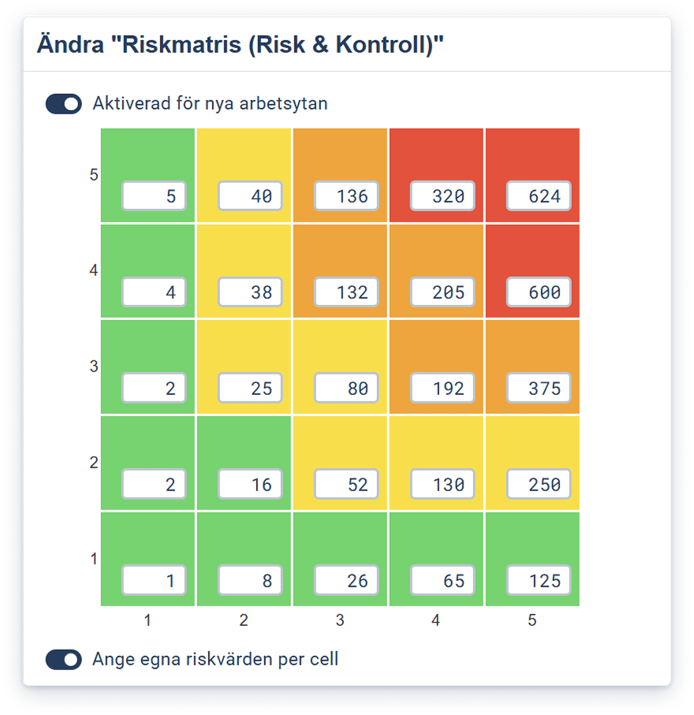
This has been a limitation of the workspace matrix which has now been removed.
Activation: Own values per cell are activated by an administrator in the matrix administration where also the values are entered.
Object drawer - new data section with graphs for KPIs
We have updated the object drawer with a new section that gives you a clearer overview of your KPIs and metrics. The new section visualizes your data in a chart together with the follow-up information - right where you work.
- See the same graph in object drawers, workspaces and follow-up for a consistent experience
- Get instant feedback when you report data, with real-time updates
- Easily validate that reported values are correct
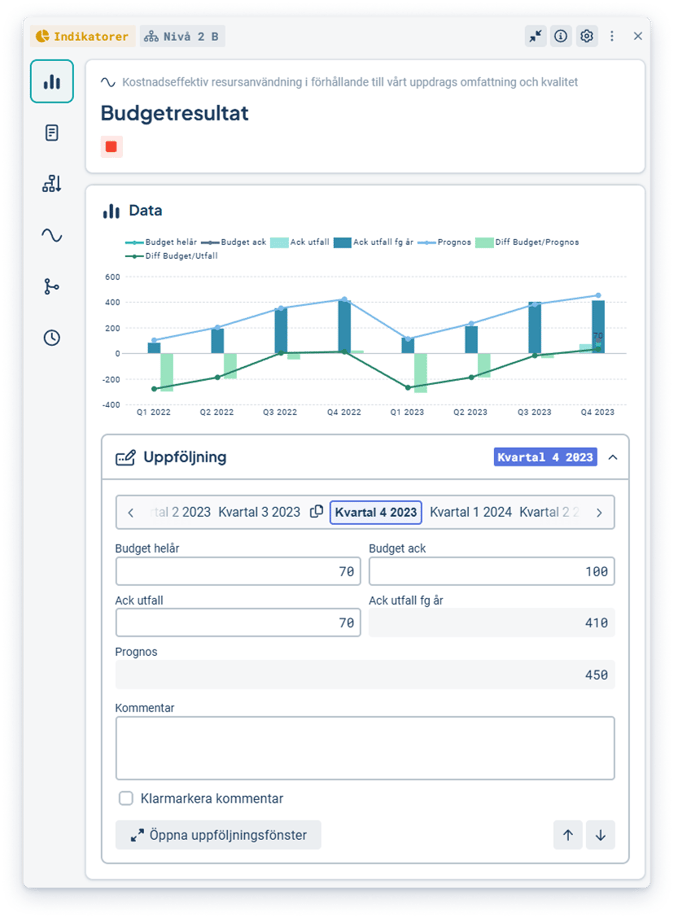
Activation: The feature is automatically available for all objects that are measures (not risks).
Measurements- support for separate consolidation formulas
Another key feature previously available in the classic edit window is now also supported in the object drawer. Define and manage separate consolidation formulas directly in the measurement settings and see which departments that applies separate consolidation formulas. This feature allows you to control how data is aggregated per data column and department - without affecting the overall configuration.
-
Customize how data is aggregated locally by department and measurement data column
-
Keep global configuration unchanged while making local adjustments
- Enhancement: Get a clear overview of which departments are using separate consolidation formulas, simplifying analysis and troubleshooting
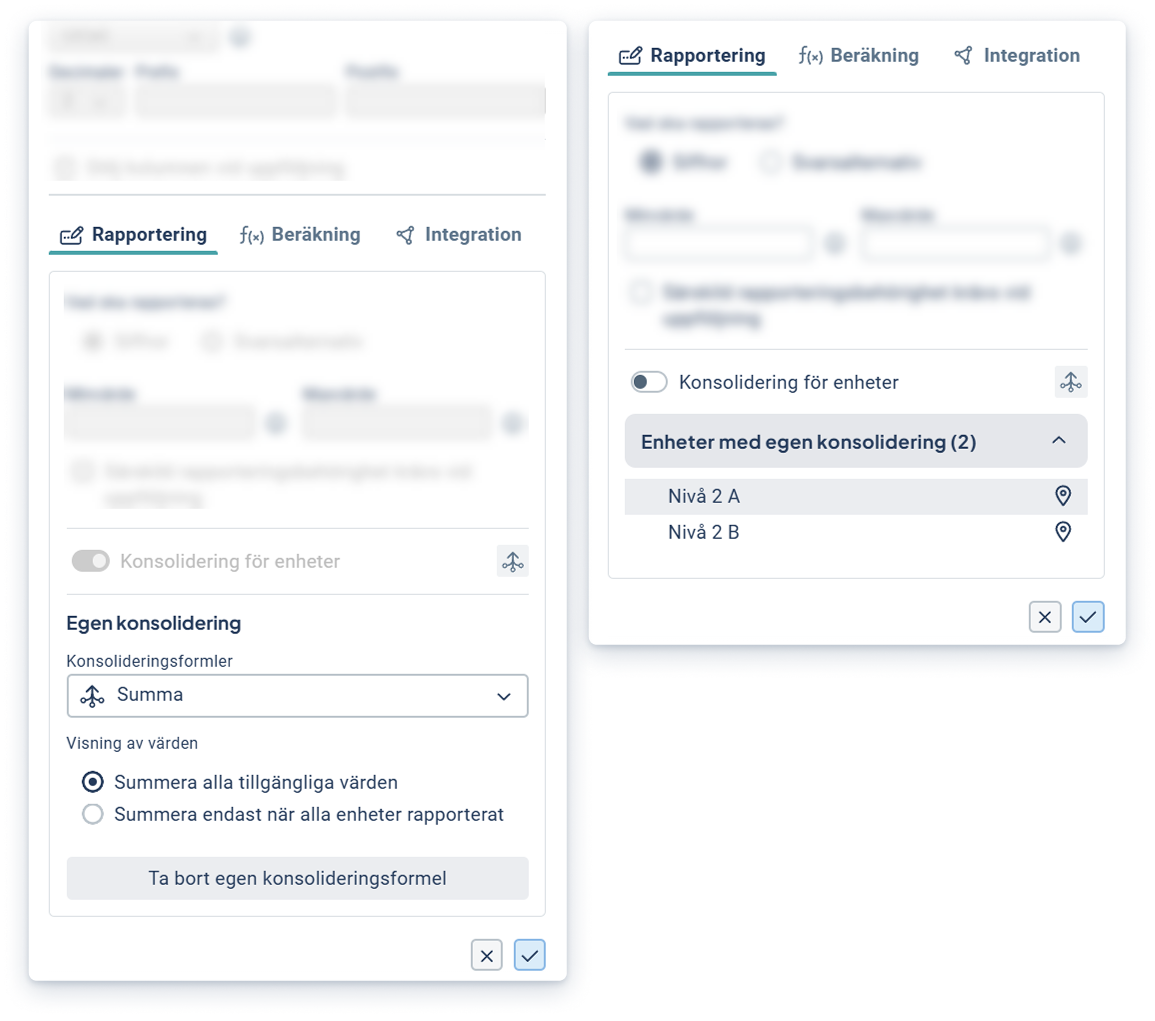
Activation: The feature is accessed via the measurement settings on underlying departments where separate consolidation formulas can be managed.
Object drawer - detect and fix broken consolidation chains
You can now easily see when a consolidation chain is broken and quickly fix the problem directly in the object window. This feature helps you ensure that data continues to flow correctly between departments, even after reorganizations or when working in planning version.
- Clear alerts show exactly where in the organization a chain is broken
- Quick action directly in the distribution section of the object drawer
- Confirmation when the issue is resolved provides peace of mind that the data is being consolidated correctly
Activation: The function is automatically displayed when a broken consolidation chain occurs.
Object drawer - distribute to same-level departments
A much-needed feature is now available in the new Object drawer: the ability to assign objects to departments at the same level in the organization. This makes it easier to work on sahred activities, such as actions and measurements, across multiple departments - especially in matrix and process-oriented organizations.
- Enables parallel working where multiple departments can work on the same activity
- Provides a clearer overview of how objects are distributed in the organization
- Streamlines management with a more intuitive approach and fewer clicks
Activation: Activated via setting on the scorecard model column under "Advanced settings". The feeature is then used through a checkbox in the object drawer to allocate to departments at the same level. When checked, you can choose which departmentes to assign to the action.
Dashboard and gadgets
This development is included in product license.
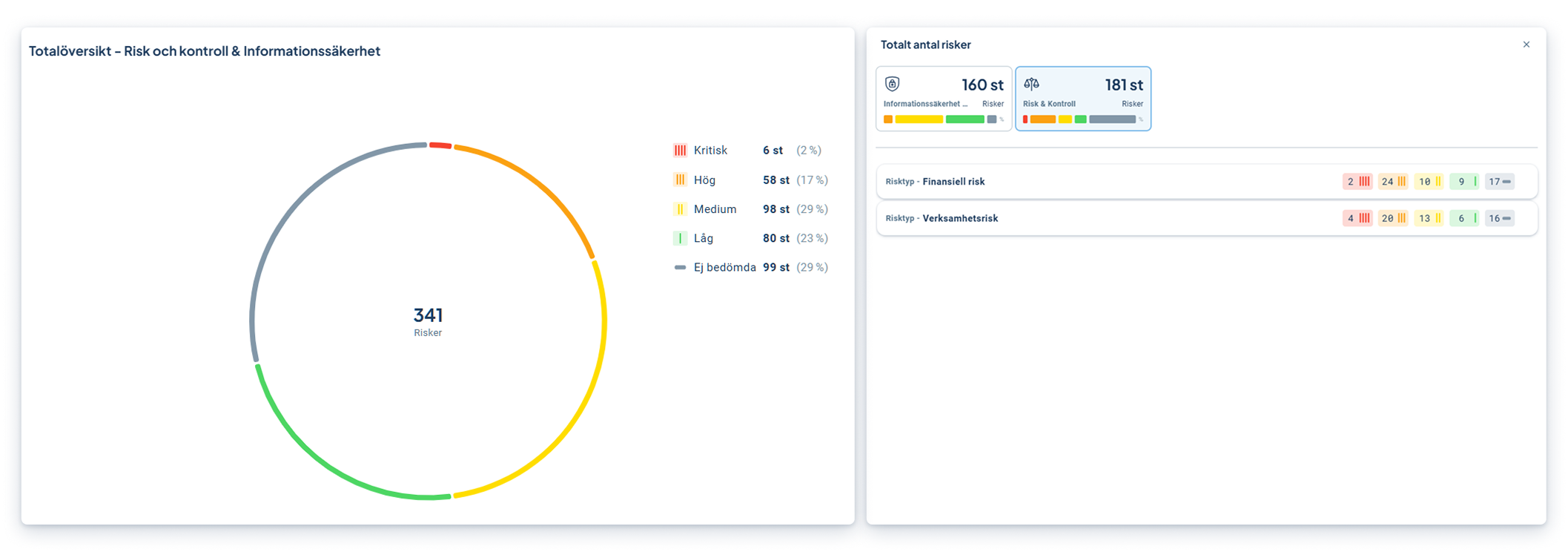
Gadgets - aggregate risks from multiple products
- Overall view of risk levels even when risks are present in different products
- Clearer and more consistent basis for monitoring and reporting risk status
- Easier overview of which products contribute most to high risk levels, for example
Due Diligence
This development is included in the Due Diligence product license.
New workflow for greater stability and clarity
The new workflow gives you better control and overview when working with large amounts of data and complex processes. With improved stability, clearer status and a more visual build experience, it's easier to create, follow and adjust workflows.
- Fewer errors and more stable runs even with large imports
- Clearer status and feedback that makes it easier to understand what's happening at each step
- A more visual and flexible workflow builder that simplifies changes and updates
.png?width=1231&height=774&name=image%20570%20(1).png)
Activation: The feature will be rolled out in stages per customer during spring and onwards. You will be informed in advance when it becomes available in your environment.
Product assessment - improvements
We've updated the product assessment feature to better support your work with product data, certificates and follow-up. The improvements make it easier to collect, import, structure and follow up information - with greater clarity throughout the process.
- Collect product data via SAQs and get a more structured data collection
- Import product data via Excel for a faster and smoother start-up
- Get better traceability with event logs and clearer follow-up of changes
%201-1.png?width=1655&height=894&name=bild%20(16)%201-1.png)
Activation: The feature is activated on request. Contact your contact person or support to get access.