If you'd like to read about AI developments from this past spring— check here!
Stratsys Assistant is being updated with new capabilities
We’re continuing to develop Stratsys’ AI and are now releasing a major update to Stratsys Assistant.
Most notably, this update enables the Assistant to utilize more information within Stratsys, perform broader analyses, and provide support in more areas of work than before. Another important new feature is that the Assistant can not only read and analyze information, but also modify information in existing objects—such as goals, risks, or actions—and create new content directly from the chat.
At the same time, the technical foundation behind the Assistant has been rebuilt. We now use MCP technology in the background. This makes the Assistant smarter, more efficient, and provides better opportunities to combine different types of information and data within the same query. Going forward, this will make it possible to connect Stratsys MCPs with other external AI tools.
Jump directly to:
The Assistant has access to more information in Stratsys
One of the biggest changes is that the Assistant can work more broadly with the information in Stratsys and is no longer as limited to the information in the workspace you’re currently in.
Depending on which features are enabled, the Assistant can, among other things, use information from:
- Products and workspaces (new)
For example, goals, risks, actions, key metrics, descriptions, comments, and other information in the objects, from multiple products. The Assistant can also analyze information from multiple organizational units. - Reports and report content (new)
The Assistant can read reports and reported data, analyze the content, and enter text. It can also help create an entirely new report. - Uploaded documents
As before, you can upload Word, PowerPoint, PDF, and Excel files for analysis. The assistant can combine the content of the documents with other information in Stratsys. Support for Excel and the analysis of larger data sets has also been improved. - Checklists and responses in Forms (New)
Responses, comments, and other information in checklists can be used to summarize results and identify, for example, deviations and areas for improvement. - Product knowledge, Lawsl and frameworks
The assistant can combine information in Stratsys with knowledge of relevant laws, frameworks, and how Stratsys works. This support has been available previously and becomes more useful when it can be combined with more of your own information.
The assistant always operates based on the user’s permissions and permission group. This means it cannot access information about a product to which the user does not have access. Read more below about the specific capabilities mentioned above.
From analysis to actually updating information
Previously, much of the Assistant’s value lay in finding, compiling, and analyzing information. With this update, the Assistant can also help modify information directly—for example, in risks, goals, or actions in Stratsys —and create content more effectively than before.
This could involve, for example, updating an object’s name or description, changing its status or comment, adding a person in charge, or entering metric data. In reports, the Assistant can write text paragraphs and create new reports.
This means that the Assistant can help with the actual work in Stratsys in more situations, rather than just providing an answer that the user then has to implement manually.
What does this mean in practice?
Here are a few examples of how the Assistant can be used—and with this update, many of these workflows become significantly more versatile and useful
1. Reduce the time you spend searching for and analyzing information
In a larger organization, relevant information can be scattered across many targets, key performance indicators, risks, reports, and organizational units. Manually compiling and analyzing it all takes time.
The assistant helps you quickly find relevant information, compile large amounts of data, and generate analyses without having to go through every detail yourself.
Example:
Which units contribute most to the change in our emissions—and what is driving that change?
What recurring challenges do you see in our follow-ups over the past year?
Summarize this information and highlight the most significant deviations.
2. Make connections and the big picture visible
Related information is often found in different products, at different organizational levels, or in different types of objects. This can make it difficult to identify important connections.
The assistant helps you analyze information across different areas and identify connections between, for example, goals, risks, activities, actions, and follow-ups.
Example:
What risks are associated with this goal?
Are there activities in different parts of the organization that appear to address the same problem?
Which objectives, risks, and activities are affected by the same recurring challenge?
3. Reduce manual administrative work
Many work tasks still involve manually moving, adding to, and updating information—for example, from Excel, documents, or workshop materials.
The assistant helps you use existing materials to create, complete, and update information directly in Stratsys.
Example:
Analyze this Excel file and create relevant actions in Stratsys.
Based on this workshop material, identify the risks we need to address further.
Update the description and status of these activities based on the latest report.
4. Ensure that the work is complete and meets requirements
It can be difficult to know whether important information is missing or whether the organization’s work complies with legal requirements, frameworks, standards, or internal requirements.
The assistant helps you identify gaps, discrepancies, and areas for improvement, and provides support on what needs to be addressed.
Example:
Are there any areas we haven’t assessed for risks based on the safety and health legislation?
What have we failed to document in this area?
Compare our work with these regulations and identify the most significant gaps.
5. Simplify reporting and follow-up
Reporting often involves collecting, compiling, processing, and formulating information before it can be used further. This can easily become a recurring manual task.
The assistant helps you use existing information in Stratsys to compile, formulate, and update reports more quickly.
Example:
Summarize the reports from the units and describe the most significant deviations and recurring challenges.
Create an executive summary based on the report’s content and include it in the appropriate section of the text.
Analyze the results reported by the underlying units and write a summary comment on the item.
Other improvements
The assistant is also getting better at handling tasks that consist of multiple steps. For example, you can ask it to analyze the results for a number of objectives, identify the largest deviations, determine which units are primarily contributing to them, summarize the results, and update relevant information in Stratsys. This allows you to describe what you want done in greater detail, rather than having to break the work down into many separate steps.
More improvements
- Updated interface when you open the Assistant, with links to learn more about the Assistant’s capabilities
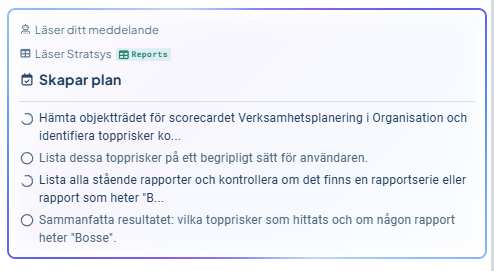
- A new to-do list appears after you ask a question, where the Assistant shows the steps it’s taking and your progress
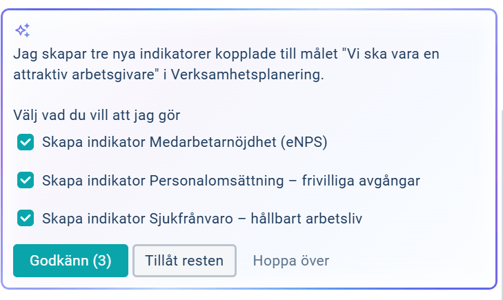
- A clearer process for confirming that the Assistant should make a change you’ve requested
Here’s what Stratsys Assistant can do
Here you can see in detail which capabilities have been added to the Assistant. All of this assumes that the user has permission to view and/or edit the relevant information.
View information in objects
- Name, description, keywords, responsible parties
- Start and end dates, activity status
- Measurement data, status (color)
- Comment
Edit information in an object
- Name, description, keywords
- Responsible parties – can add a responsible party via email or add yourself as a responsible party
- Activate the item from drafts
- Measurement data and response options
- Status (color)
- Comment – replaces existing comment
Create an object on the device the user is currently using
All new items are created as drafts. When creating an item, the assistant can add:
- Name, description, keywords
- Add the user as the responsible person
Restrictions
- This feature does not work in the planning version.
- Changes to existing objects can only be made on the object’s main unit. This will be improved gradually.
Reports
The assistant can:
- Read the report, including its content, structure, and division into sections
- Write content in text sections
- Create new reports with headings, text paragraphs, and manual tables
Limitation: The assistant cannot currently create report sections.
Continued development of the Assistant
We are continuing to develop the Assistant on an ongoing basis. Support for creating and editing information will be expanded gradually, as will the ability to work with information from more parts of Stratsys.