![Stratsys-logo-deep-blue.png]](https://www.stratsys.com/hs-fs/hubfs/Stratsys%20Logos/Stratsys-logo-deep-blue.png?height=27&name=Stratsys-logo-deep-blue.png)
Description
Stratsys Alerts is a special feature that is designed to inform users about important and critical changes that occur within the platform.
By activating Stratsys Alerts, users can stay informed about important events and changes in real time, enabling them to take swift actions and make well-informed decisions in their work, such as risk management and strategic planning.
These notifications differ from the regular notifications in Stratsys in the following ways:
- Alerts are displayed in a separate stream with higher priority in the notification center to avoid mixing with other less important notifications.
- These high-priority alerts are also sent via email to reach users who may not be logged into the Stratsys platform at the time of the change.
In the notification center, you can open the KPI that acauses the alert directly from the fow by clicking on the KPI.
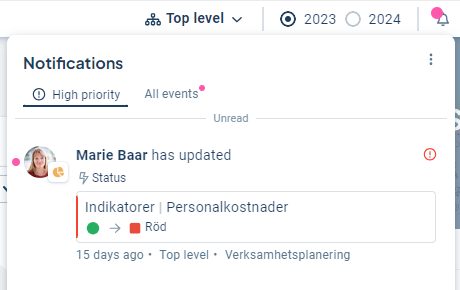
Who receives the notifications?
All users who are part of the responsibility roles for the specific risk or metric receive the notification, along with any additional recipients specified in the Alerts settings.
If a responsible user has made the change themselves, no notification is triggered for that user.
Prerequisites for activating Alerts
- You need a product license
-
Alerts for changes in risks must be set up as risk KPI's.
Activate Alerts
As an administrator, you can activate Alerts by clicking on the clock icon to the right of the organization selector, and then selecting the context menu (three dots) and choosing “Alerts”.
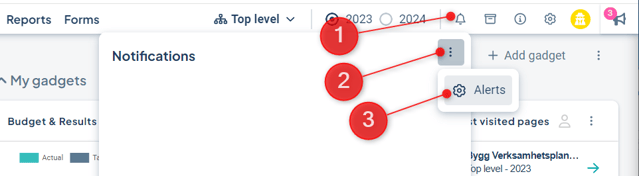
You can activate alerts for:
- Changes in risk value within risk metrics.
- Color changes for regular metrics.
To enable Alerts, follow these steps:
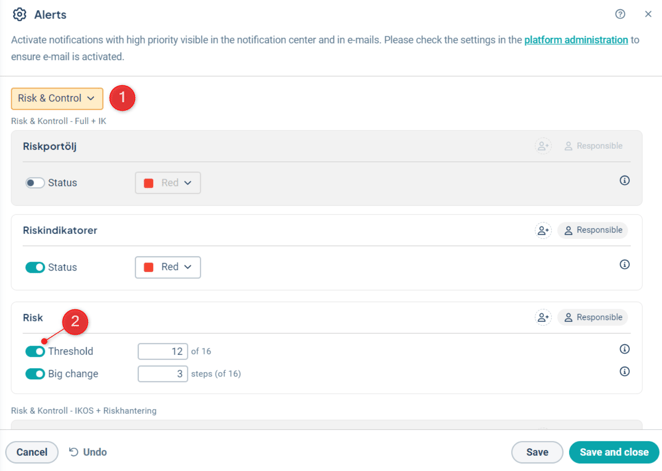
- Filter by product or scroll down the list until you find the relevant column.
- Activate an Alert by toggling the switch to the left of the trigger you want to receive alerts for.
-
Edit the value that the trigger should have - read more below.
-
If needed, add more responsible people who will receive alerts.
The standard is that the person responsible for the risk or KPI receives the alert. If others are also to be notified, you can add these by pressing the icon with the person with the plus sign.

Alerts for Risk KPIs
There are two different alerts to activate for risk KPIs.
1) Large change: When an existing risk is reassessed and a major change occurs in the risk value.
2) Threshold value: When a risk is created or reassessed and the risk value reaches a threshold value.
You can see what the maximum risk value is in the setting.
Alerts for regular KPIs
For regular KPIs, you can activate an Alert if the color of the KPI changes to or above a certain level.
Only Stratsys standard colors are supported. It is not possible to set alerts for KPIs with custom colors.
Depending on the settings in the administration, there are three or four standard colors to choose from, and these go from low to high value as follows:
3 colors: (Low) Green - Yellow - Red (High)
4 colors: (Low) Green - Light green - Orange - Red (High)
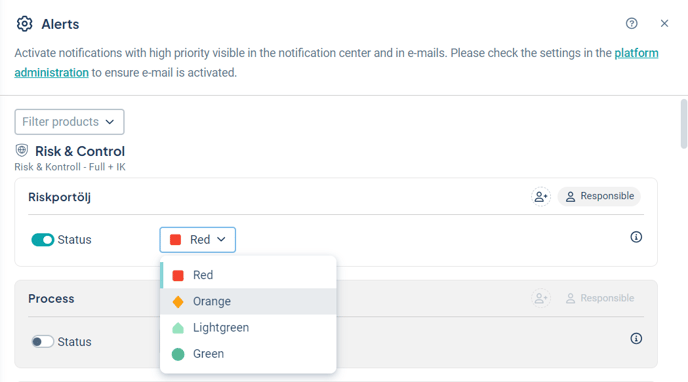
When a KPI reaches the set color or a higher value, the responsible parties receive an alert that the color has reached this status.
If the value is set to “Orange”, an alert is sent both when the status becomes “Orange” or the higher value “Red”.