![Stratsys-logo-deep-blue.png]](https://www.stratsys.com/hs-fs/hubfs/Stratsys%20Logos/Stratsys-logo-deep-blue.png?height=27&name=Stratsys-logo-deep-blue.png)
Description
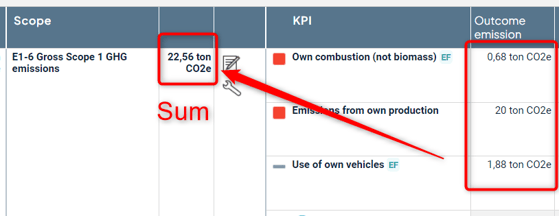
With the help of the function aggregated KPI data, values from several different KPI's values can propagate from right to left in your information model completely automatically.
The function supports aggregation of maximum value and summation of data. You can forward several values from the same KPI.
Permissions and prerequisites
- This function requires a product license.
- In order to set up the function, you must have the right to administer the scorecard.
Setup
Setting in the scorecard column
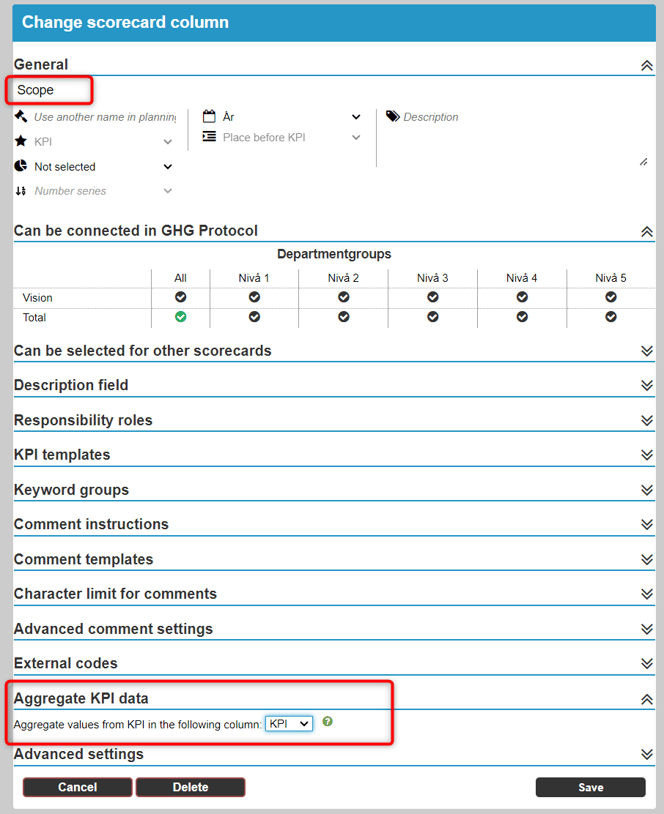
The scorecard columns that should aggregate KPI data from another scorecard column needs to point out which column to aggregate in the setting.
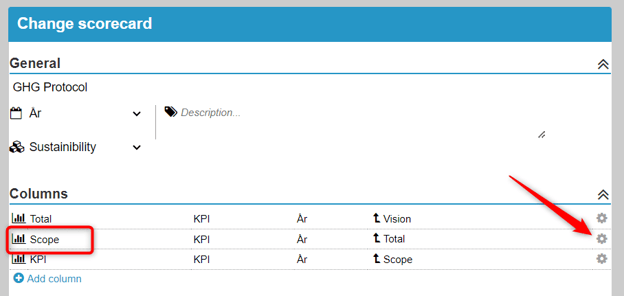
In the example below, we want the KPI column "Scope" to aggregate values reported in KPI column named "KPI".
Edit the Scorecard in the administration and click on the cog wheel for the column that should aggregate values:
Expand the "Aggregate KPI data" section and select the column, in this case the column named "KPI":
Calculation formula in the KPI's
A tip is to create a KPI template for each scorecard column the should be included in the aggregation chain to make sure the calculation formula will be correct for all the KPI's.
Read more about KPI templates.
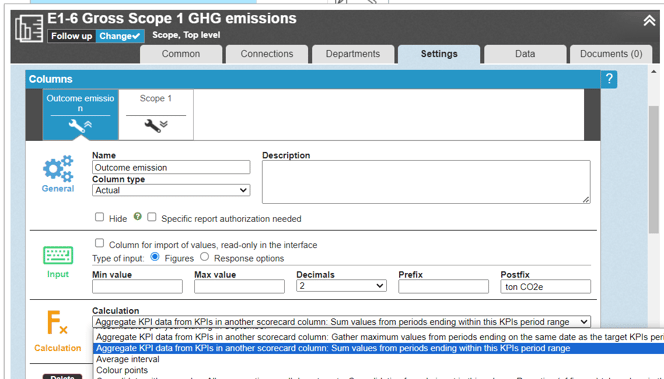
The columns for the KPI that will aggregate data should have one of the calculation formulas beginning with “Aggregate KPI data…” - choose to sum the result or aggregate the maximum value from all KPI's.
Name of KPI columns
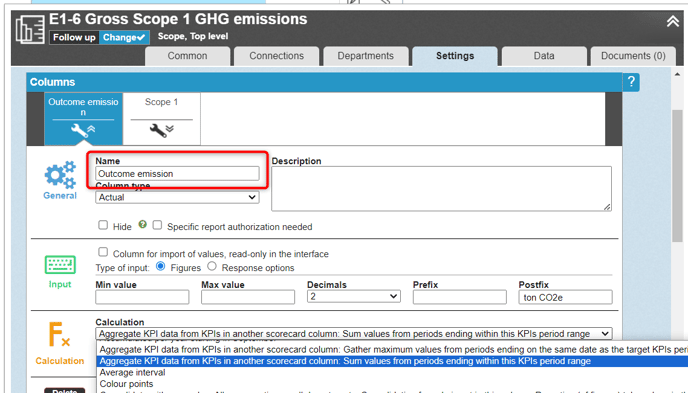
For the aggregation to work, the columns in the KPI's must have exactly the same name - in our example, there must therefore be a KPI column called “Outcome emission” in all KPI whose values are to be aggregated.
Periodicity and aggregated values
If the KPI's that are aggregated have the same periodicity the outcome is aggregated for each period separately, both for maximum value and for sum.
If the KPI's have different periodicity:
- For sum, all values within the date interval that the period for the dimension that values are aggregated to are summed.
- For maximum value, the value that has the same end date as the period for the dimension that values are aggregated to is retrieved.
Difference between aggregated KPI data and consolidated data
The function of aggregated KPI data has similarities with consolidated data. In the case of consolidation, you send data between different levels in the organization, e.g. from lower units up to the department level.
With aggregated KPI data, you work on the same organizational unit and forward data to more central processes within the same unit, for example from information objects to systems and processes.
Limitations
- Aggregation is only supported for one scorecard per KPI. If the KPI has multiple connections, make sure that aggregation of KPI data does not occur in other scorecard.
- A scorecard column will only be able to aggregate KPI data from one other scorecard column.
- A scorecard column can only aggregate measure data from a column that is to the right.
- There is only support for maximum value and sum (not minimum value etc)
- The aggregated maximum and sum values cannot be edited manually
- There is no visual indication in the interface that KPI data is being aggregated - it is only visible in the calculation formula inside the KPI
- Inline edit in the view is only supported indirectly - to get an updated aggregated value via inline edit, the page needs to be reloaded.
Troubleshooting
Is the aggregation not working at all?
Check the following:
- Do the KPI columns have exactly the same name? Watch out for extra spaces in the name, for example.
- Do you have consolidation and calculation for the same KPI column? It generally does not work - remove the consolidation from the calculation column, it is enough to consolidate the outcome column.
- Does the KPI have multiple connections? Make sure that the KPI are not aggregated in more than one control model.
Is the sum / maximum value calculated, but incorrectly?
Check the following:
- Do the KPI have different periodicity in different control model columns? Read about how this works in the section above.
- Do the KPI have other calculations and few or no visible decimals? Then it could be a rounding error. Increase the number of visible decimals to check.
- Are there individual KPI's that are not included in the calculation? Check the points under “Is the aggregation not working at all?” above for the suspected measure/measures.