![Stratsys-logo-deep-blue.png]](https://www.stratsys.com/hs-fs/hubfs/Stratsys%20Logos/Stratsys-logo-deep-blue.png?height=27&name=Stratsys-logo-deep-blue.png)
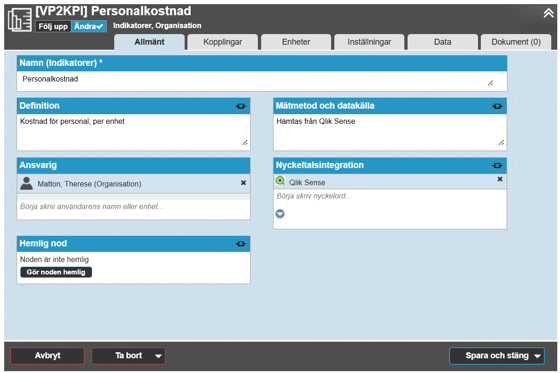
The object window has existed in Stratsys for about 2 years and was then a new way of working with your objects. We are now taking the next step, where the classic edit window will be phased out and only the object window can be used.
The change is part of our long-term work to further develop a more modern, simpler, and more efficient user experience. This information is aimed at those of you who have not yet started using the object window, so that you can gain a better understanding of what it is and how the transition will take place.
Content
The edit window that will no longer be supported
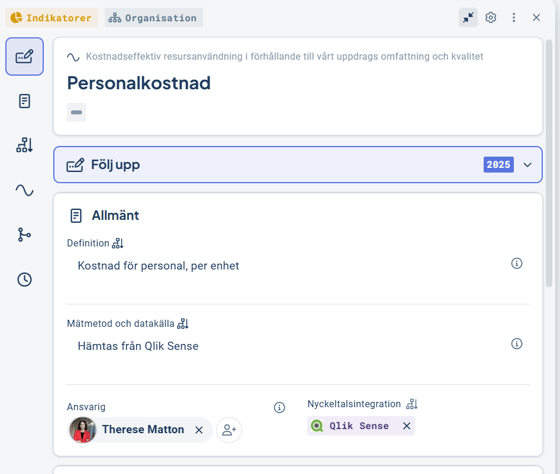
The object window that will become the standard
Time plan for the transition
On April 15, the object window will become the standard everywhere in Stratsys. This will happen automatically in all views where it is not already activated. If you after that need to access the edit window, it can be reached via the three-dot menu in the upper right corner under "classic edit window".
From May 31, it will no longer be possible to switch back to the edit window. After that, the edit window can no longer be used.
Please note! What is changing is how you create, edit, and work with objects – via the object window instead of the edit window. No other parts of Stratsys are affected. For example, the follow-up window works exactly as before, as do views, content, etc.
What happens next?
We recommend that you inform your users as soon as possible. Please use the support material that describes the object window – you will find it in the section below.
From mid-February, a message will be displayed in the edit window stating that it will be replaced by the object window. Users will also see a message the first time they click into the object window, providing more information about how it works for easy use.
You can activate the object window in the views you want before April.
If you have questions or would like to discuss what this means for your usage, you are warmly welcome to contact your representative.
About the object window
The object window is the interface we will continue to develop going forward to create and edit objects. It provides, among other things:
A more user-friendly and consistent way of working with objects.
Access to functionality that does not exist in the edit window – for example, structuring information into sections or AI suggestions.
Faster improvements over time, as all development takes place in a shared interface.
Here you can read more about the object window
Here is a short video showing the object window
Please feel free to share these with your users!
News in the object window
As more and more users work in the object window, we have also added new functionality, including:
Reconciliation dates for activities
The ability to control whether the follow-up section should be displayed or not, depending on needs.
Move objects from one unit to another
We continuously release ongoing improvements and new functionality, both entirely new features and features that are not yet available in the object window today, such as support for local consolidation formulas.