![Stratsys-logo-deep-blue.png]](https://www.stratsys.com/hs-fs/hubfs/Stratsys%20Logos/Stratsys-logo-deep-blue.png?height=27&name=Stratsys-logo-deep-blue.png)
Prerequisites To
be able to add users, you need the role Administrator or Owner in DD.
To be able to add a user, the user must first be created in Platform Center.
Add a user in Due Diligence

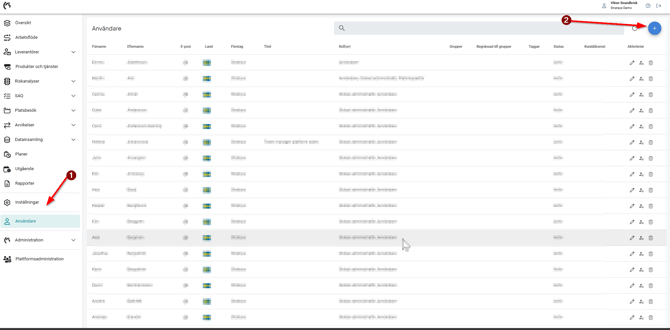
Start by going to Users (1), then select the blue plus sign at the top right (2):
After clicking the plus sign, search for the user you want to add, then click on the correct user:
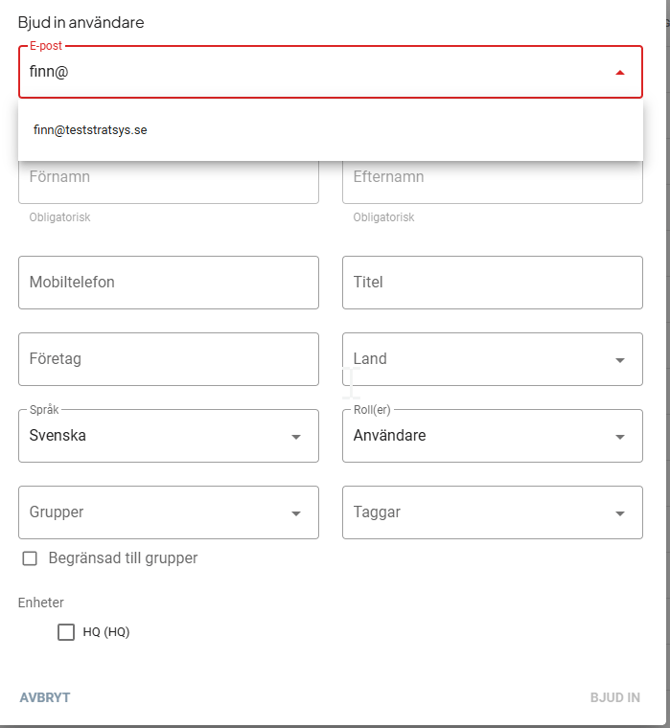
After selecting the user, you can now fill in various fields for the user.
-
First and last name will be automatically retrieved from Platform Center.
-
Phone number for the user.
-
Title for the user.
-
Company the user belongs to.
-
Which country the user belongs to.
-
Language for the user.
-
Roles for the user, you can read more about roles in Due Diligence here.
-
Group the user should belong to.
-
Tags for the user.
-
It is possible to restrict the user to only the groups filled in point 8.
-
Unit the user should belong to.
After checking that all info is correct, you can press "Invite", then a link will be sent to the user to log in.